We will try everything we normally do – from Wireless via Samba sharing to MP3 playback – and then some. I will test four times: two laptops and two installations, one 32-bit and 64-bit. And check everything in KDE and Gnome. This is probably the most extensive test I have done yet. We will practically do everything, from scratch. So not only is this a review, it’s a full blown tutorial to turning your CentOS into a superb desktop.
Some of the stuff waiting you just a few mouse scrolls below:
- Live CD checks on two laptops (Wireless, Bluetooth, Web camera, NTFS support)
- Installation of a 32-bit edition
- Installation of a 64-bit edition
- Solving screen resolution issues
- Compilation
- Installing VMware Tools (in VMware Server and ESXi)
- Configuring startup programs in the session
- Configuring proxy
- Solving update problems via proxy
- Samba sharing
- Adding extra repositories
- Flash Player 10 on 32-bit and 64-bit machines
- MP3, Windows video playback
- Installing cool software (VLC, Skype, others)
- Applications
- Making CentOS pretty (new themes, styles in KDE and Gnome)
And more … until your eyes water from sweet exhaustion. It shall definitely be intriguing. So follow me. Spare an hour or two and have a lovely read.
Author: acuervo
-
CentOS 5.3 – Serious Linux for serious people
I always liked RedHat. Whenever you hear about serious business (banks, Stock Markets, Health care) running Linux, somewhere in there is RedHat. CentOS is the exact same thing, except for the RedHat branding. It is also free.Did I mention this website runs on CentOS?via dedoimedo.com -
CentOS 5.3 – Serious Linux for serious people
I always liked RedHat. Whenever you hear about serious business (banks, Stock Markets, Health care) running Linux, somewhere in there is RedHat. CentOS is the exact same thing, except for the RedHat branding. It is also free. Did I mention this website runs on CentOS?We will try everything we normally do – from Wireless via Samba sharing to MP3 playback – and then some. I will test four times: two laptops and two installations, one 32-bit and 64-bit. And check everything in KDE and Gnome. This is probably the most extensive test I have done yet. We will practically do everything, from scratch. So not only is this a review, it’s a full blown tutorial to turning your CentOS into a superb desktop.
Some of the stuff waiting you just a few mouse scrolls below:
- Live CD checks on two laptops (Wireless, Bluetooth, Web camera, NTFS support)
- Installation of a 32-bit edition
- Installation of a 64-bit edition
- Solving screen resolution issues
- Compilation
- Installing VMware Tools (in VMware Server and ESXi)
- Configuring startup programs in the session
- Configuring proxy
- Solving update problems via proxy
- Samba sharing
- Adding extra repositories
- Flash Player 10 on 32-bit and 64-bit machines
- MP3, Windows video playback
- Installing cool software (VLC, Skype, others)
- Applications
- Making CentOS pretty (new themes, styles in KDE and Gnome)
And more … until your eyes water from sweet exhaustion. It shall definitely be intriguing. So follow me. Spare an hour or two and have a lovely read.
via dedoimedo.comPosted via web
-
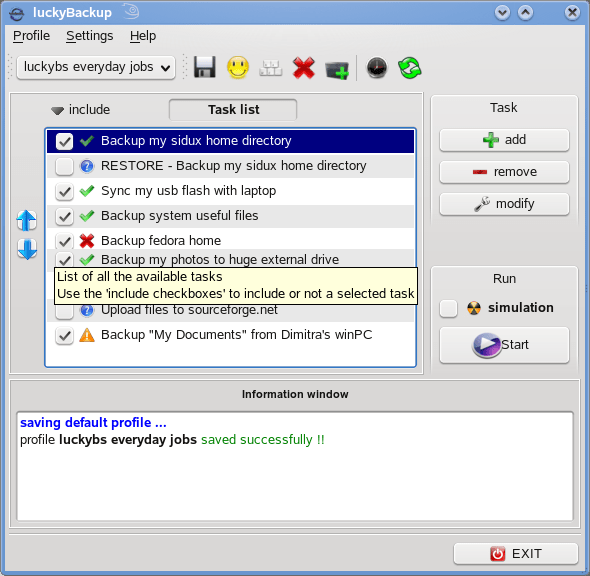
luckyBackup – backup and sync utility
Another very good back-up software for Linux. Using rsync it does backup or directory syncing, including remote transfers. Very solid.
EDIT: It seems I spoke to soon, luckyBackup chocked while backing up about 500GB of data overnite. Memory consumption was about 670MB when it became unresponsive. This is on a quad-core with 4gb of ram, so resources were plentiful. After the initial backup, subsequent delta transfers finished correctly.
-
Failing is part of the process of winning.
9 out of 10 business are destined to fail.
Posted via email
-
Nice graphical representation of cell phone manufacturers market share
via gizmodo.comIf you ever wanted to see clearly how hard Apple is beating everyone else.