Updated October 19 2011 to use never version drivers. Works on Debian and LMDE too.
Tired of wasting money buying ink-jet cartridges that run out without even using them, I recently bought a Canon ImageCLASS MF4270 Laser Printer. It is also a multifunctional device with scanner, copier and fax.
Canon now provides .deb files for easy installation of their ImageCLASS MF4270 printer on Ubuntu Linux (or other debian based distributions). Unfortunately they are only providing them for i386 (32 Bit Systems)
For RPM based distributions however, they do provide 64-Bits installation files.
Using alien I converted these 64bit RPM to deb.
I am making them available here for your convinience:
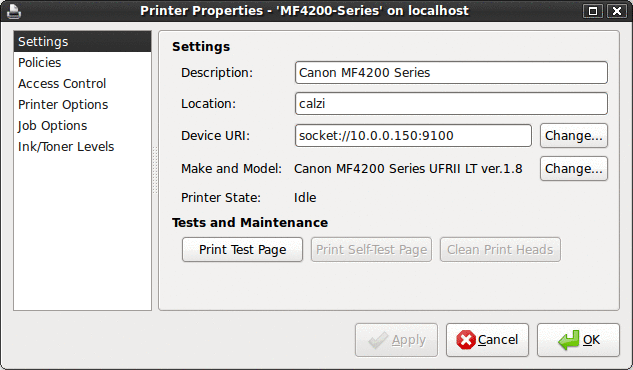
Dont forget to set the device URI to: socket://xxx.xxx.xxx.xxx:9100 (x’s being the IP address of printer)
For the scanner part follow this guide:
https://blog.alejandrocuervo.com/installing-canons-imageclass-mf4270-scanner-on-ubuntu-64-bit/
Related links:
http://mp610.blogspot.com/2008/04/give-your-scanner-new-freshly-sane.html
Original: October 25 2008.
EDIT: Updated April 24 2009 to use never version drivers.
EDIT: Updated October 19 2011 to use never version drivers.